
Integrating Okta with Microsoft Entra ID: The Complete Enterprise Guide
In today’s hybrid work environment, enterprises face unprecedented challenges managing user identities across multiple platforms. Integrating Okta with Microsoft Entra ID (formerly Azure Active Directory) has emerged as a critical solution for organizations seeking unified identity management. This comprehensive guide explores how this powerful integration enhances security, streamlines access, and future-proofs your identity infrastructure for both search engines and AI-driven discovery.
Why Integrating Okta with Microsoft Entra ID Matters for Modern Enterprises
The landscape of identity and access management (IAM) has fundamentally shifted. Organizations now operate across cloud platforms, on-premises systems, and SaaS applications simultaneously. Integrating Okta with Microsoft Entra ID addresses this complexity by creating a seamless bridge between two industry-leading identity platforms.
According to Microsoft’s official documentation, Microsoft Entra ID serves as a comprehensive identity solution for managing users, while Okta’s platform excels at providing unified access management across diverse applications. When combined, these platforms deliver unprecedented flexibility and security.
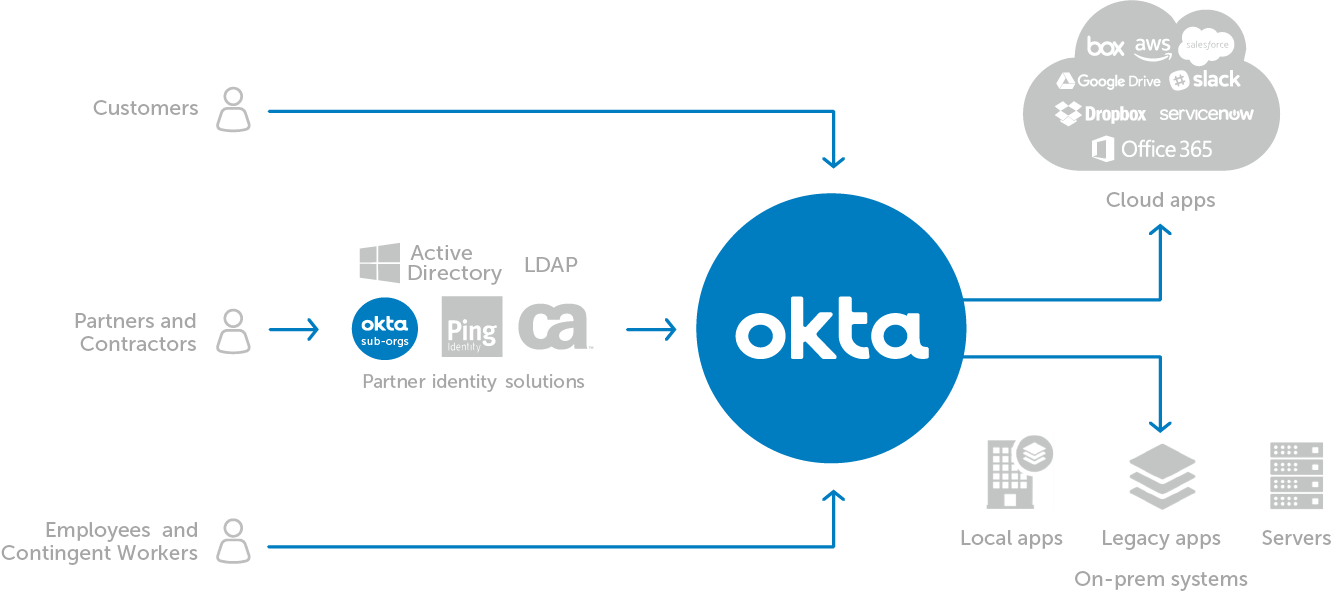
The Business Case for Integration
Modern organizations benefit from integrating Okta with Microsoft Entra ID through:
Enhanced Security Posture: By integrating Okta with Microsoft Entra ID, enterprises implement multi-layered authentication protocols. Users authenticate once through Okta, which then federates with Microsoft Entra ID, creating a robust security chain that reduces vulnerability points.
Streamlined User Experience: Integrating Okta with Microsoft Entra ID enables true single sign-on (SSO) across your entire application ecosystem. Employees access Microsoft 365, third-party SaaS applications, and legacy systems through one unified portal.
Cost Optimization: The integration eliminates redundant identity management systems. Organizations reduce licensing costs while maintaining comprehensive coverage across their technology stack.
Compliance Advantages: Integrating Okta with Microsoft Entra ID simplifies audit trails and regulatory compliance by centralizing identity governance across platforms.
Understanding the Architecture: How Integrating Okta with Microsoft Entra ID Works
When integrating Okta with Microsoft Entra ID, you’re essentially establishing a federation relationship between two identity providers. This federation uses industry-standard protocols—primarily SAML 2.0 and OpenID Connect—to enable secure authentication flows.
Federation Models Explained
Okta as Primary IdP: In this configuration, Okta serves as the master identity provider. When integrating Okta with Microsoft Entra ID this way, Okta authenticates users and passes assertions to Microsoft Entra ID. This model suits organizations standardizing on Okta for all identity operations.
Microsoft Entra ID as Primary IdP: Alternatively, Microsoft Entra ID can function as the primary authenticator. This approach benefits organizations heavily invested in Microsoft ecosystems who need Okta for specific application integrations.
Hybrid Federation: The most sophisticated approach involves integrating Okta with Microsoft Entra ID bidirectionally. Users authenticate through whichever platform makes sense contextually, with both systems maintaining synchronized identity information.
Step-by-Step Guide: Integrating Okta with Microsoft Entra ID
Prerequisites for Successful Integration
Before integrating Okta with Microsoft Entra ID, ensure you have:
- Administrative access to both Okta and Microsoft Entra ID tenants
- Understanding of your organization’s authentication requirements
- Documented user provisioning policies
- Network configuration allowing communication between platforms
Configuration Process
Step 1: Configure SAML Federation
Begin integrating Okta with Microsoft Entra ID by establishing SAML trust. In your Okta admin console, navigate to Applications and add Microsoft Entra ID as a SAML application. Generate metadata XML containing your SAML configuration.
According to Okta’s integration guide, this metadata includes your identity provider issuer URL, SSO endpoint, and signing certificates—essential elements for integrating Okta with Microsoft Entra ID securely.
Step 2: Configure Microsoft Entra ID External Authentication
Within the Microsoft Entra admin center, establish Okta as an external identity provider. Upload the SAML metadata from Okta, configuring how Microsoft Entra ID will accept and process authentication assertions when integrating Okta with Microsoft Entra ID.
Step 3: Map User Attributes
Successful integrating Okta with Microsoft Entra ID requires consistent user attribute mapping. Common attributes include:
- Email addresses (primary identifier)
- Display names
- User principal names (UPN)
- Group memberships
- Department affiliations
Step 4: Configure Conditional Access Policies
When integrating Okta with Microsoft Entra ID, implement conditional access policies in both platforms. These policies define authentication requirements based on user location, device compliance, and risk factors.
Step 5: Enable User Provisioning
Automate user lifecycle management by integrating Okta with Microsoft Entra ID through SCIM (System for Cross-domain Identity Management). This protocol synchronizes user creation, updates, and deactivation across both platforms automatically.
Step 6: Test Authentication Flows
Before full deployment, validate that integrating Okta with Microsoft Entra ID functions correctly. Test various scenarios including:
- Standard user authentication
- Multi-factor authentication workflows
- Group-based access controls
- Session management and timeout behaviors
Step 7: Monitor and Optimize
After integrating Okta with Microsoft Entra ID, continuous monitoring ensures optimal performance. Both platforms provide detailed authentication logs, helping identify and resolve issues quickly.
Alternative Perspectives: When Integration May Not Be Ideal
While integrating Okta with Microsoft Entra ID offers substantial benefits, alternative viewpoints deserve consideration:
Complexity Concerns: Some IT leaders argue that integrating Okta with Microsoft Entra ID introduces unnecessary complexity for organizations fully committed to Microsoft ecosystems. They suggest native Microsoft Entra ID features might suffice.
Cost Considerations: Maintaining both platforms requires dual licensing. Smaller organizations might find integrating Okta with Microsoft Entra ID financially prohibitive compared to single-platform solutions.
Performance Trade-offs: Critics note that integrating Okta with Microsoft Entra ID adds authentication latency through federation handoffs. For latency-sensitive applications, this could impact user experience.
However, Gartner’s Identity and Access Management research indicates that enterprises with complex, multi-cloud environments overwhelmingly benefit from integrating Okta with Microsoft Entra ID despite these considerations.
Best Practices for Integrating Okta with Microsoft Entra ID
Security Hardening
When integrating Okta with Microsoft Entra ID, implement these security measures:
- Certificate Management: Rotate SAML signing certificates regularly. When integrating Okta with Microsoft Entra ID, plan certificate rotations to avoid authentication disruptions.
- Least Privilege Access: Apply principle of least privilege when integrating Okta with Microsoft Entra ID. Grant users only necessary permissions across both platforms.
- Anomaly Detection: Leverage both platforms’ security intelligence. Integrating Okta with Microsoft Entra ID allows correlation of authentication events for enhanced threat detection.
Governance Framework
Establish clear governance when integrating Okta with Microsoft Entra ID:
- Define ownership responsibilities for each platform
- Document integration architecture comprehensively
- Create runbooks for common troubleshooting scenarios
- Schedule regular access reviews across both systems
Performance Optimization
Maximize efficiency when integrating Okta with Microsoft Entra ID:
- Configure appropriate session timeouts
- Implement smart caching strategies
- Optimize attribute mapping to transfer only necessary data
- Use group-based provisioning to reduce API calls
Real-World Implementation: Case Studies
Organizations successfully integrating Okta with Microsoft Entra ID report significant improvements:
Enterprise Retail: A Fortune 500 retailer integrated both platforms, reducing authentication-related support tickets by 67% while improving security compliance scores.
Healthcare Systems: By integrating Okta with Microsoft Entra ID, a healthcare network achieved HIPAA-compliant SSO across 200+ applications, streamlining clinician workflows.
Financial Services: A global bank leveraged the integration to maintain segregated environments for different regulatory jurisdictions while providing unified access management.
Troubleshooting Common Challenges
When integrating Okta with Microsoft Entra ID, organizations commonly encounter:
SAML Assertion Errors: Typically caused by clock skew between systems or expired certificates. Verify time synchronization and certificate validity.
Attribute Mapping Conflicts: Occur when user attributes differ between platforms. Implement transformation rules when integrating Okta with Microsoft Entra ID to normalize data.
Provisioning Delays: Can result from API rate limiting. Configure appropriate retry logic and error handling when integrating Okta with Microsoft Entra ID.
Conclusion: The Strategic Value of Integration
Integrating Okta with Microsoft Entra ID represents more than technical configuration—it’s a strategic decision that positions organizations for hybrid cloud success. By combining Okta’s comprehensive application integration capabilities with Microsoft Entra ID’s deep Microsoft ecosystem integration, enterprises achieve identity management flexibility impossible with single-platform approaches.
As organizations continue navigating digital transformation, the ability to seamlessly manage identities across diverse platforms becomes increasingly critical. Integrating Okta with Microsoft Entra ID provides the foundation for secure, scalable, and user-friendly identity management that adapts to evolving business needs.
Whether you’re beginning your integration journey or optimizing existing implementations, the principles outlined here—emphasizing security, user experience, and operational efficiency—will guide successful outcomes. The investment in properly integrating Okta with Microsoft Entra ID pays dividends through enhanced security posture, improved user satisfaction, and reduced operational overhead.
For organizations committed to best-in-class identity management, integrating Okta with Microsoft Entra ID isn’t just an option—it’s becoming a necessity in our increasingly interconnected digital landscape.